


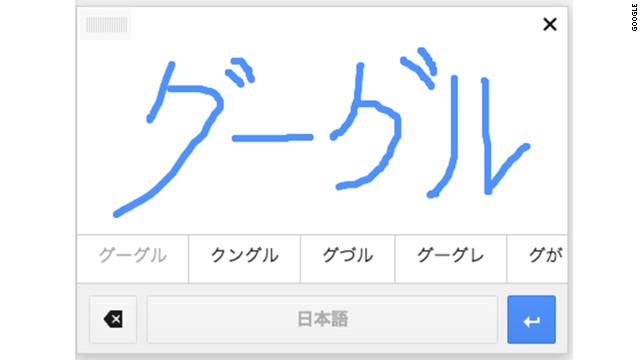
The tool is mainly designed for languages in which some characters are easier to draw than type.
STORY HIGHLIGHTS
- Google has added a tool that reads your handwriting and turns it into text
- The new input option is available on Gmail and Google Docs
- It's aimed at languages where drawing a character might be easier than typing it on a keyboard
But now, Google is
bringing some good old fashioned handwriting back to modern
communication, adding new handwriting input tools to Gmail and Google
Docs.
Those tools now allow you
to write out what you want to say with a mousepad or cursor and Google
will do its best to create a typed version of your words. The input box
will show the most likely matches for your word, so below your
handwritten "cats" it might display this list of possible words: cats,
rats, Cats, oats, and carts. Click on the right one and keep on writing.
The tool might have a
harder time deciphering your fancy calligraphy or messy chicken
scratches, but it seems to do a decent job with my sloppy cursive-ish
writing.
While English is an
option, it's more for complicated alphabets where drawing out a
character is sometimes easier than typing it, like Japanese or Hindi.
"Handwriting input makes
the internet easier to use by people worldwide and is also part of a
larger effort to break the barrier between languages," said Google's
Xiangye Xia in a blog post announcing the feature.
Gmail users can get the new tool in more than 50 languages, Google Docs users in more than 20.
To test it out, go to
your Gmail or Docs settings and, under the Languages setting in the
General tab, click "Show all language options." Select the box that says
"Enable input tools" and you'll get a list of every type of keyboard
Google has to offer. The languages with a pencil icon beside them are
the ones that support written words.
Once you've added an
input option, you can select it anytime from a drop down on top of the
menu bar above the document or email you're writing.
Google already has
handwriting support for its mobile translation apps so you can scrawl a
word on the screen and see it instantly in another language. This is
particularly helpful if you're not familiar with a local alphabet and
want to know what something says.


0 comments:
Post a Comment